AUTOMOTIVE CRM · BUILT BY DEALERSHIP OPERATORS
Every conversation.
A clearer next move.
Connect your leads, conversations, showroom, and deals—with AI that finds opportunities and helps your team follow through.
 aiVenta / Customer workspaceA closer look inside the CRM

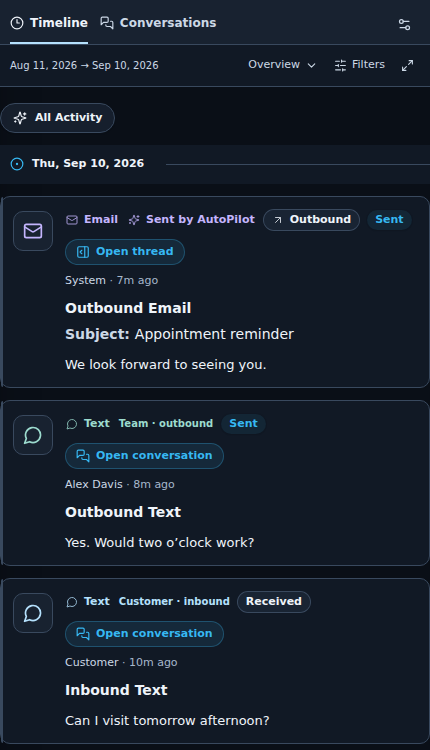
KEEP THE CUSTOMER IN VIEW
Pick up where
the conversation left off.
See the vehicle, the appointment, and the conversation in one customer workspace.
- 01Know what was said.
Review the customer’s message and your team’s reply.
- 02See who took action.
Sender and delivery details stay with each activity.
- 03Make the next move.
Keep contact actions close to the customer’s context.
Inspect the full product captures
Keep the handoff moving.
Leads, conversations, appointments, and showroom activity stay connected.
Give follow-up a reason.
Bring customer history and vehicle context into the next conversation.
Look behind the number.
Review the customer evidence behind team activity and outreach results.
YOUR DAILY WORK, CONNECTED
One platform.
Your whole dealership.
Sales, BDC, service-to-sales, and leadership. Give each team the tools for their part of the customer journey.
Explore all CRM featuresSales & BDC
Internet and phone leads, response gaps, ownership, appointments and floor traffic.
Connected communications
SMS, email and voice tied to the customer timeline and the right team.
DealDesk & appraisals
Retail, lease and cash scenarios, trades, worksheets and customer portal collaboration.
Inventory & programs
Vehicle context and uploaded program intelligence for more relevant sales conversations.
Vehicle Exchange
Give service-to-sales teams a focused view of opportunities, workload and follow-through.
Reporting & attribution
Explore traffic, team performance and outreach results, down to customer evidence.
AI THAT HELPS YOUR TEAM ACT
Find the opportunity.
Follow it through.
See how VentaSideKick finds an opening, Next Play guides the conversation, and reporting connects the activity.
Interactive walkthrough · Illustrative dataThe next conversation is already in your CRM.
Connect a quiet shopper’s history with a relevant reason to reach out. VentaSideKick surfaces the opportunity and explains the context before the journey begins.
See how VentaSideKick worksEligibility, customer state and contact permissions are checked before outreach.
aiVentaPRODUCT WALKTHROUGHAn overlooked shopper. A relevant new opening.
- Customer history
- Previously considered an SUV
- Engagement
- No recent conversation
- Current context
- Matching inventory available
A fresh conversation starts with current context. An old trade request is history, not proof that the customer still wants to trade.
Give the team a reason. And a next move.
The customer timeline becomes a practical action plan: what matters, why now, how to start the conversation, and which channel makes sense.
Explore Next PlayRecommendations give the salesperson context; they do not establish customer intent.
aiVentaPRODUCT WALKTHROUGHCustomer context → a focused next step.
- Evidence
- Recent SUV interest
- Next action
- Reconnect with a relevant option
- Conversation
- Ask whether timing has changed
Start with their previous interest, acknowledge the time that has passed, and ask a clear question. Let the customer confirm what matters today.
Keep the conversation moving, with context.
VentaSideKick can execute eligible outreach in autonomous mode. Lead Drip keeps existing lead journeys moving. Sender, customer state and contact rules stay part of the workflow.
Explore Lead DripFictional message example. Actual outreach depends on your configuration and current customer context.
aiVentaPRODUCT WALKTHROUGHA thoughtful opening. A clear handoff.
- Sender
- Resolved dealership advisor
- Context
- Previous vehicle interest
- Next step
- Reply handed to the team
Hi Alex, it’s Jordan with the dealership. You previously looked at SUVs with us. We have a few options that may be worth a fresh look. Is an SUV still on your radar, or has your search changed?
Go from a number to the customer behind it.
Follow engagement, appointments and influenced sales across your outreach programs. Drill into customer evidence, then use Ask Venta to help focus the team’s next actions.
Explore reporting & attributionIllustrative sequence, not a measured customer result or a claim of incremental lift.
aiVentaPRODUCT WALKTHROUGHConnected activity. Inspectable outcomes.
- Source
- VentaSideKick journey
- Customer event
- Two-way conversation
- Team follow-through
- Appointment recorded
Open the customer evidence behind a result. Review the outreach and subsequent activity together, without treating every later sale as caused by a campaign.
You choose how SideKick works. Review opportunities in Shadow mode, require Manager Approval, or enable eligible Autonomous outreach.
Explore all five opportunity lanes Ask Venta: answers for your teamCONTROL & ROLLOUT
Built for your team.
Scoped to your stores.
Review role permissions, store access, communication controls, and your rollout requirements before making a change.
How is Ask Venta different from VentaSideKick?
Ask Venta helps teams investigate CRM questions, inspect evidence and organize missions, goals and internal follow-up tasks. VentaSideKick is the separate opportunity engine that can execute eligible customer outreach in autonomous mode.
Does aiVenta support dealership groups?
aiVenta includes role-based access and store-scoped workflows, along with reporting across selected teams and rooftops. A demo is the place to review your group structure, permissions and rollout requirements.
Can I see the CRM with my team’s workflows?
Yes. Request a guided demo and tell us your rooftops, current systems and priorities. We can focus the walkthrough on your sales, BDC, service-to-sales or leadership workflows and discuss data and integration requirements.